Aller au contenu
View in the app

A better way to browse. Learn more.

Patrol-GR

A full-screen app on your home screen with push notifications, badges and more.

To install this app on iOS and iPadOS
  1. Tap the Share icon in Safari
  2. Scroll the menu and tap Add to Home Screen.
  3. Tap Add in the top-right corner.
To install this app on Android
  1. Tap the 3-dot menu (⋮) in the top-right corner of the browser.
  2. Tap Add to Home screen or Install app.
  3. Confirm by tapping Install.

Bienvenue sur Patrol-GR

Une communauté reconnue, détendez-vous en compagnie d'autres Trollers et partagez votre passion !

Je m'inscris
Nos Trucs et Astuces

N'hésitez pas, usez et abusez... de ces astuces pour l'entretien, les réparations et les modifications.

Juste ici
Nos sorties 4x4

À consommer sans modération !

Ici

Compte Premium

Abonnez-vous au compte Premium et découvrez tous ses avantages !

Juste ici

Présentation chris

Featured Replies

Posté(e) :

Salut la team ! Merci de votre accueil, et pour l'acceptation au sein du forum 😁

Je m'appel Christopher (j'ai une préférence pour "Chris svp"), je vie en Lozère.

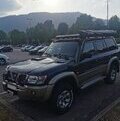
Je suis l'heureux propriétaire d'un Patrol long Y61 GR 3.0 244k km environ , acheté il y a quelques mois, aujourd'hui préparer pour le bivouac, qui nous fait vivre de magnifiques aventures !

Hâte de vous rencontré, discuter, échanger, même si nous sommes très souvent en baroude, j'essaierai d'être présent un minimum 🙃

Je souhaite une bonne journée à tous le monde, à bientôt j'espère, Chris

IMG_20260914_083157.jpg

Modifié par Chrispatrol61

Posté(e) :

Bienvenu ici !!

Créer un compte ou se connecter pour commenter

Account

Navigation

Rechercher

Rechercher

Configure browser push notifications

Chrome (Android)
  1. Tap the lock icon next to the address bar.
  2. Tap Permissions → Notifications.
  3. Adjust your preference.
Chrome (Desktop)
  1. Click the padlock icon in the address bar.
  2. Select Site settings.
  3. Find Notifications and adjust your preference.